Shein Free Trial Center: A step-by-step guide on how to participate
Advertisements
in Shein’s Testing Portal
A straightforward breakdown of the actual stages — based on Shein’s support guidelines — to help you understand the process clearly.
Independent educational guide — Derived from publicly available documentation in Shein’s Help Center. We are not connected to Shein. Participation involves potential selection, and approval is never guaranteed. Always review the specific conditions for each offer.
If you have ever accessed the trial hub, browsed around, and felt uncertain — that is a common experience. The system is simple once you recognize the proper order of operations.
Below is a practical overview showing how shoppers submit requests, monitor status updates, and provide reviews. Being selected is never guaranteed, but adhering to the standard workflow helps prevent errors that cause early rejections.
1Locate the Product Evaluation Hub
Sign in to your registered account. Within the mobile app, navigate to your account dashboard → More Services (or Additional Services) → Free Trial Center. On desktop, check under the main community/support tabs.
Explore the items open for applications. The roster rotates frequently, so current offerings may change quickly.
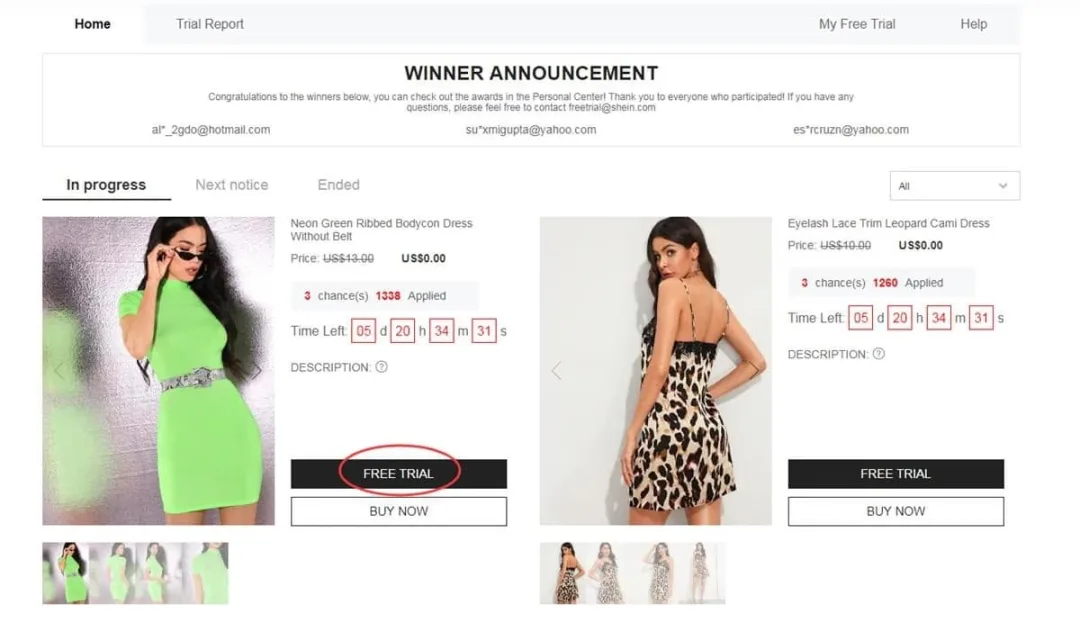
Example navigation route to the trial area
2Submit up to 3 requests per week
Accounts receive up to 3 submission entries each week. Unused slots expire at the end of the weekly cycle and do not stack.
When you find an item you hope to evaluate:
- Click Free Trial under the selected product
- Select your correct size parameters
- Verify a delivery address located in the same region as the regional site you are currently browsing
- Select Submit
Note: If the destination country does not correspond with the platform region, the request may fail. Re-verify this detail before finalizing.
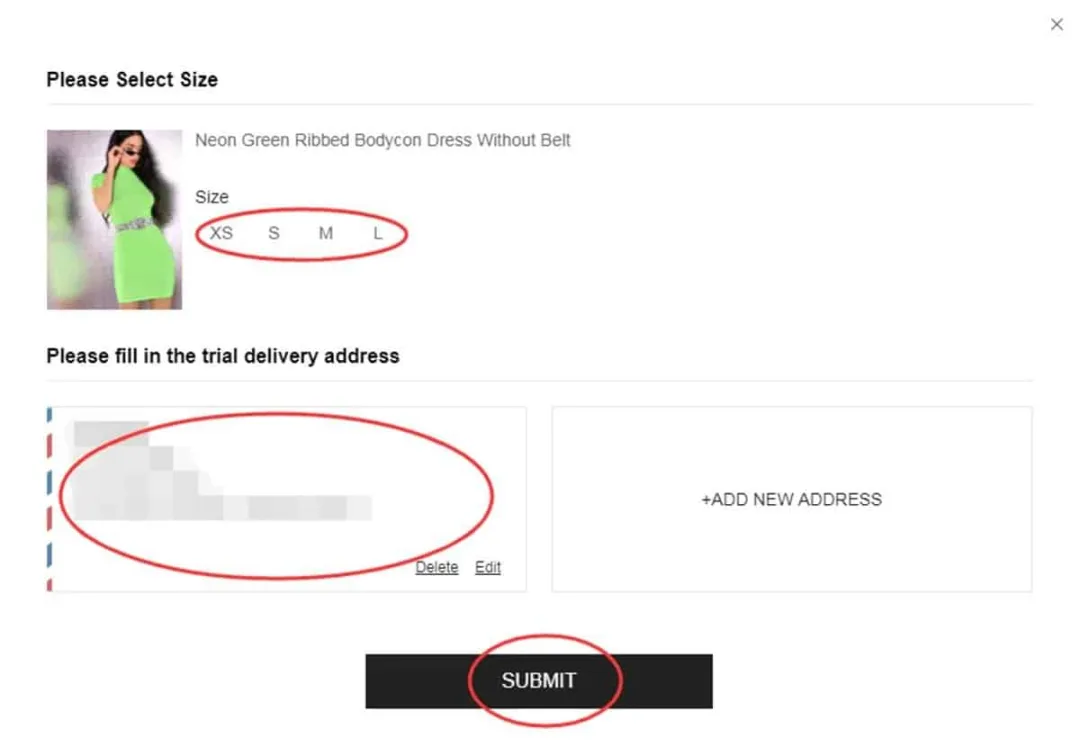
Selecting measurements and shipping details
3Track selection updates in My Applications
Review periods generally take around 7 days. Access My Free Trial / My Applications to check status indicators:
- Approved — your entry was chosen. A zero-cost order is generated and dispatched automatically.
- Failed — this specific application did not advance. You can enter requests for other items as new openings refresh.
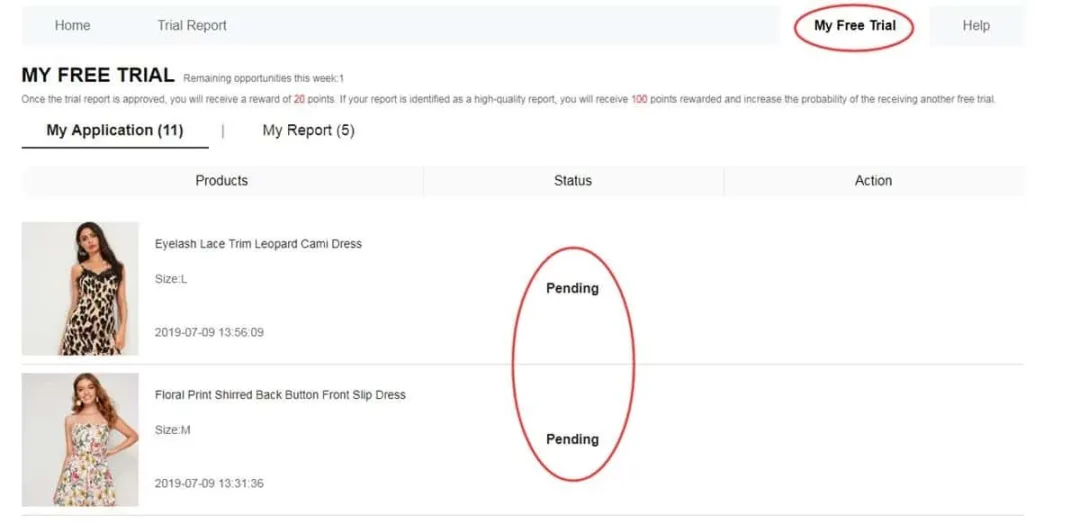
Dashboard section showing Approved / Failed updates
4Evaluate the item and publish your review
If chosen and the item is delivered, inspect its quality, sizing, material, cut, and general finish.
Then publish an authentic evaluation through your account panel — typically within 10 days after delivery. Track your progress under My Report.
Recommended evaluation elements include:
- Balanced feedback covering both pros and cons (not just praise)
- Clear imagery — ideally including full-length views and detail shots
- Specific details regarding fit, fabric feel, and practical wearability
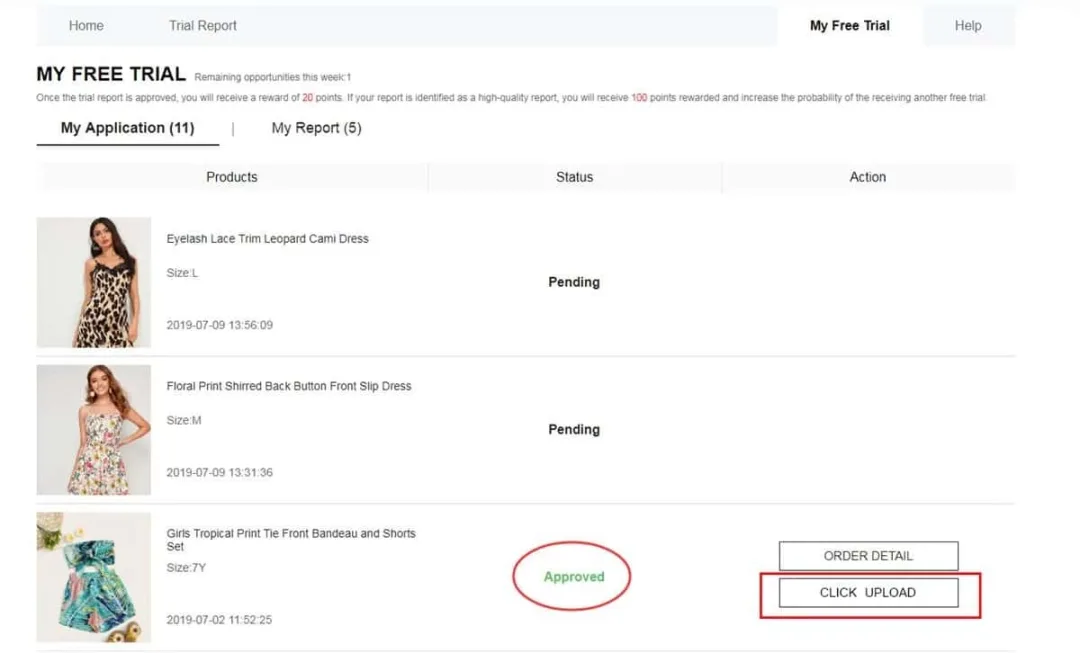
Feedback upload page example
Reward points: An approved feedback report can yield roughly 20 points. A Quality Report designation may add around 100 extra points.
If an initial report is declined, users typically receive one chance to make corrections and re-submit.
Key program conditions
• Limit of 3 submissions per week (chances do not accumulate)
• Shipping address must correspond to the regional domain of the site being used
• Standard delivery cost is covered; import fees may apply depending on local regulations
• Aim to publish the review within 10 days following receipt
• Operating duplicate or fake profiles can result in account exclusion
• Skipping required feedback can reduce candidate chances in future cycles
Oversights that frequently hinder selection
❌ Incomplete profile setups or inaccurate sizing info
❌ Addresses registered in a different country from the site version
❌ Submitting requests long after popular product slots have filled
❌ Brief, generic feedback lacking clear photos
❌ Missing the designated review submission window
❌ Creating secondary accounts to increase submission volume
Frequently Asked Questions
Is postage covered by the platform?In standard trial campaigns, regular shipping costs are handled. Depending on your destination country, local import taxes may still apply.
How many items can I apply for each week?Up to 3 weekly slots. Unused application attempts expire at the end of the week.
Do selected candidates keep the evaluated items?Yes. In standard evaluation rounds, chosen participants usually retain the product once they publish the required review.
How long does status processing take?Typically about one week. Check My Free Trial / My Applications to view Approved or Failed updates.
What happens if a review report is rejected?You generally get one additional opportunity to revise and resubmit. Review photo and detail guidelines closely.
Is a large social media following required?No. Detailed evaluations and consistent platform participation matter much more than social follower counts.
That covers the full workflow: access the trial portal → submit entries (max 3/week) → wait for status updates → if selected, receive the package → submit genuine feedback with photos. Keep profile details accurate, apply early when new lists appear, and fulfill all review requirements.
Ready to check current openings?
Explore available options right now and apply following the steps outlined above. Selection is never guaranteed.
GO TO THE TRIAL HUB NOWYou will be redirected to Shein’s official Free Trial Center.
Source reference: Shein Free Trial Help Center